

Thời gian gần đây, trào lưu 'du hành thời gian' biến hình chụp hiện đại thành những bức chân dung mang phong cách hoài niệm của những năm 1980 đang lan truyền mạnh mẽ trên mạng xã hội. Nếu là trước đây, việc tạo ra một bức hình như vậy thường đòi hỏi kỹ năng đồ họa cao và tốn nhiều thời gian công sức, thì hiện tại, mọi người đều có thể tận dụng ngay tính năng xử lý hình ảnh của ChatGPT (hoặc các công cụ AI khác) để bắt kịp xu hướng này chỉ trong vài phút.
Cách 'bắt trend' tạo hình ảnh phong cách 'thập niên 80'
Đầu tiên, bạn cần chuẩn bị sẵn một tấm hình selfie rõ nét của bản thân, hoặc của người bạn muốn làm giúp. Tiếp theo, truy cập vào địa chỉ https://chatgpt.com/images/prompt/80s-flashback, sau đó đăng nhập vào tài khoản ChatGPT để bắt đầu sử dụng (tài khoản miễn phí vẫn có thể tạo hình ảnh).
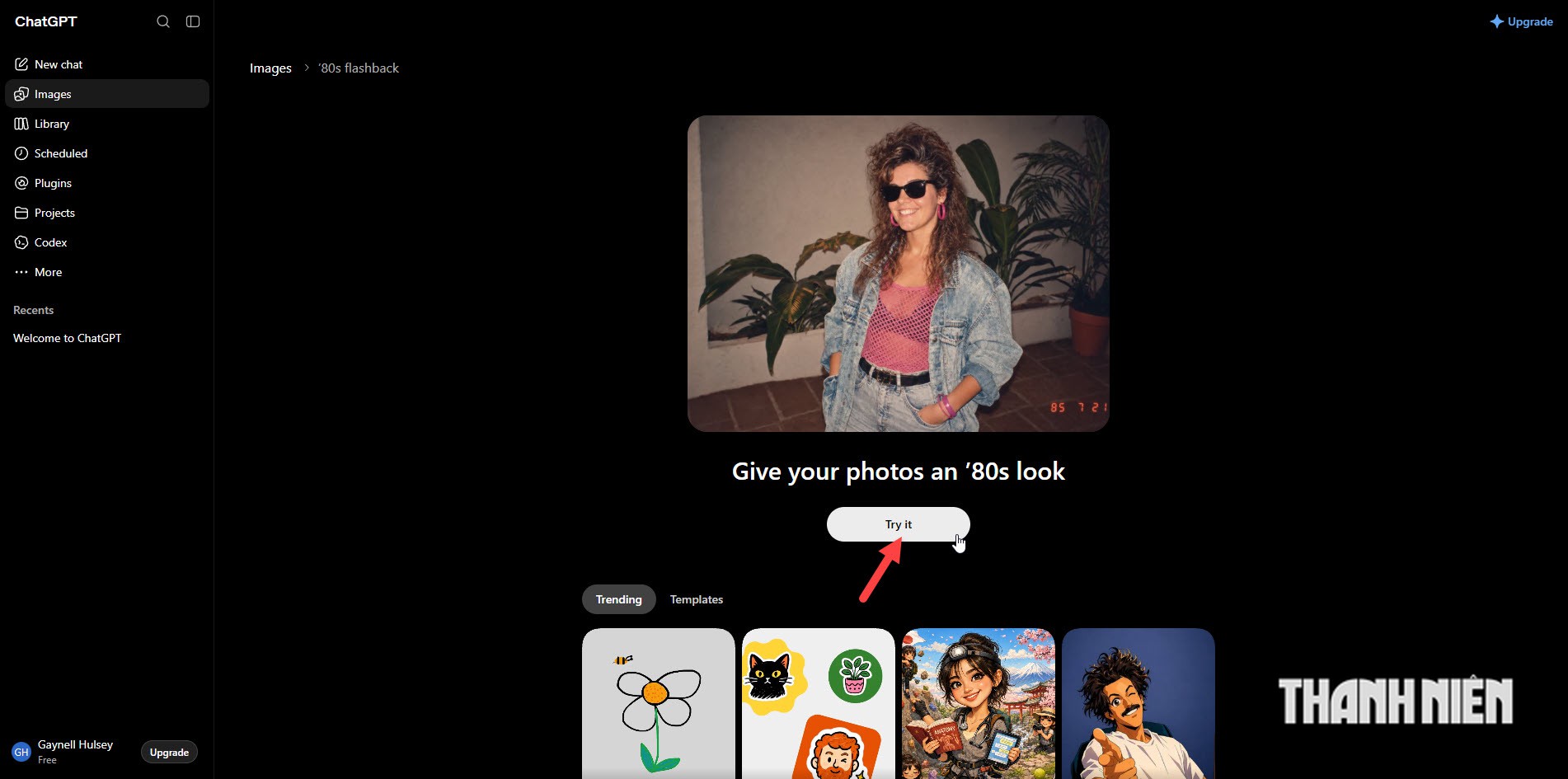
Giao diện của mẫu tạo hình ảnh theo trend thập niên 1980 trên ChatGPT
ẢNH: CHỤP MÀN HÌNH
Tiếp theo, trong giao diện chào mừng xuất hiện, bấm nút 'Try it' và chọn đến hình ảnh bạn đã chuẩn bị ở bước đầu tiên. Lúc này, chatbot sẽ tự động thực hiện các bước, gồm tải hình ảnh lên máy chủ, nhập câu lệnh (prompt) và quá trình xử lý hình ảnh.
Sau khi xử lý, hình ảnh sẽ xuất hiện trong khung hội thoại, bạn chỉ việc rê chuột lên hình ảnh và bấm vào nút chia sẻ, chọn Download để tải về với chất lượng cao.
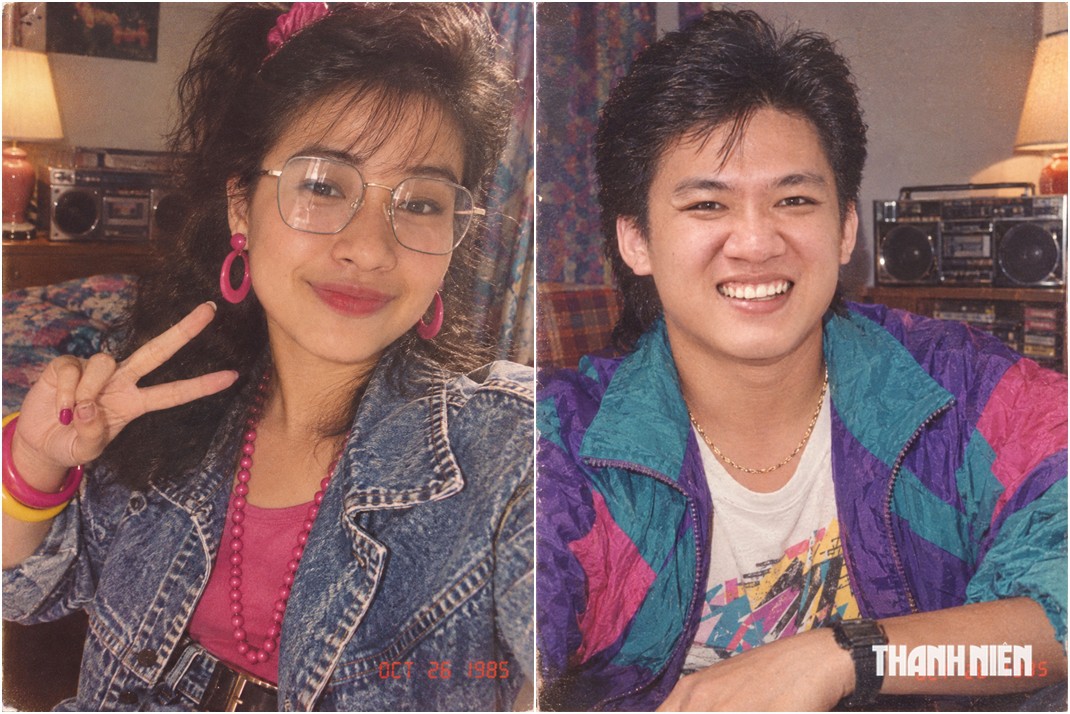
Hình ảnh được tạo bởi ChatGPT
ẢNH: PHONG ĐỖ
Nếu không sử dụng ChatGPT, bạn có thể sử dụng câu lệnh sau đây để thực hiện tạo hình ảnh với các chatbot khác như Gemini hay Grok. Câu lệnh như sau: "Using my uploaded photo, show me what I would have looked like around 1985. Preserve my identity, facial features, skin tone, age, and recognizable appearance. Reimagine my hair, clothing, accessories, and surroundings with bold, unmistakably mid-1980s styling—expressive silhouettes, statement accessories, layered details, distinctive colors, and textures. Make it feel like a genuine 1985 photograph with analog grain, faded color, direct flash, and subtle softness. Add a period-accurate 1980s red-orange date stamp in the lower corner. No recognizable posters. No modern objects or text".
//Chèn ads giữa bài (runinit = window.runinit || []).push(function () { //Nếu k chạy ads thì return if (typeof _chkPrLink != 'undefined' && _chkPrLink) return; var mutexAds = '<zone id="l2srqb41"></zone>'; var content = $('[data-role="content"]'); if (content.length > 0) { var childNodes = content[0].childNodes; for (i = 0; i < childNodes.length; i++) { var childNode = childNodes[i]; var isPhotoOrVideo = false; if (childNode.nodeName.toLowerCase() == 'div') { // kiem tra xem co la anh khong? var type = $(childNode).attr('class') + ''; if (type.indexOf('VCSortableInPreviewMode') >= 0) { isPhotoOrVideo = true; } } try { if ((i >= childNodes.length / 2 - 1) && (i < childNodes.length / 2) && !isPhotoOrVideo) { if (i <= childNodes.length - 3) { childNode.after(htmlToElement(mutexAds)); arfAsync.push("l2srqb41"); } break; } } catch (e) { } } } }); function htmlToElement(html) { var template = document.createElement('template'); template.innerHTML = html; return template.content.firstChild; } function tnDetailInsertMidArticleWidget(rootSelector, widgetId) { var root = document.querySelector(rootSelector); if (!root) return null; var contentRoot = root.querySelector('[data-role="content"]') || root; var blocks = Array.from(contentRoot.children).filter(function (el) { if (el.id === widgetId) return false; if (el.hasAttribute('data-check-position')) return false; if (el.hasAttribute('data-type')) return false; if (/^(SCRIPT|STYLE|TEMPLATE|LINK|NOSCRIPT)$/.test(el.tagName)) return false; if (el.tagName === 'P' && !el.textContent.trim()) return false; return el.getClientRects().length > 0; }); if (!blocks.length) return null; var rootRect = contentRoot.getBoundingClientRect(); var idx; if (rootRect.height > 0) { var midY = rootRect.top + rootRect.height / 2; for (idx = 0; idx < blocks.length; idx++) { if (blocks[idx].getBoundingClientRect().bottom >= midY) break; } if (idx >= blocks.length) idx = blocks.length - 1; } else { idx = Math.floor(blocks.length / 2); } var target = blocks[idx]; var isMedia = target.tagName === 'FIGURE' || target.classList.contains('VCSortableInPreviewMode'); var newDiv = document.createElement('div'); newDiv.id = widgetId; contentRoot.insertBefore(newDiv, isMedia ? target : target.nextSibling); return newDiv; } function tnOnReady(fn) { if (document.readyState !== 'loading') fn(); else document.addEventListener('DOMContentLoaded', fn, { once: true }); } (function () { if (!(window.pageSettings && pageSettings.allow3rd && (typeof window._isAdsHidden === 'undefined' || !window._isAdsHidden))) return; if (laNuocNgoai) return; tnOnReady(function () { var pernewDiv = tnDetailInsertMidArticleWidget('div.detail-cmain', 'tn_detail_foryou1_pc_per'); if (!pernewDiv) return; loadJsAsync('https://js.aiservice.vn/rec/tn_detail_foryou1_pc_per.js', function(){}, function() { window.boxTNRecs.err.push('rec/tn_detail_foryou1_pc_per.js'); }); }); })(); (function() { if (!(window.pageSettings && pageSettings.allow3rd && (typeof window._isAdsHidden === 'undefined' || !window._isAdsHidden))) return; if (typeof window.laNuocNgoai === 'undefined' || !window.laNuocNgoai) return; tnOnReady(function () { var newDiv = tnDetailInsertMidArticleWidget('div.detail-cmain', 'taboola-mid-article-widget'); if (!newDiv) return; window._taboola = window._taboola || []; window._taboola.push({ mode: 'thumbnails-4x1', container: 'taboola-mid-article-widget', placement: 'Mid Article Widget', target_type: 'mix' }); }); })();